


Skullcandy
3.54.16K Reviews
App Specs
- Version
- 5.0.5
- Updated On
- License
- Free
- Downloads
- 5,000,000+
- Developer
- Skullcandy Inc.
- Categories
- Music & Audio
- Platform
- Android
Screenshots


 Analysis by AppCompare
I tend to judge a headphone companion app by one practical question: does it help me get more out of the earbuds I already own, or does it become another screen I rarely open? Skullcandy’s app is aimed at the first job. It is a free music and audio app from Skullcandy Inc., and its most useful idea is bringing sound adjustments and device-related controls together rather than asking me to rely only on the default sound from my headphones.
Making the sound feel more personal
The appeal of changing an equalizer is not simply that I can make music louder or add bass. It gives me a way to respond when a particular mix sounds muddy, sharp, or thin through my own earbuds. A small adjustment can make a familiar playlist more comfortable without changing the track or switching headphones. I would treat this as fine-tuning, though, not a magic fix for every recording or a replacement for good-fitting hardware.
That distinction matters if you are deciding whether to install it. The app is most relevant when you use compatible Skullcandy earbuds and want more say over how they sound. If you listen through a variety of unrelated headphones, a general-purpose audio player or your phone’s built-in sound controls may be the more convenient place to manage settings. This app’s appeal is its connection to Skullcandy gear, not a promise to improve every listening setup.
What sound customization changes day to day
When I adjust an equalizer, I try to make one change at a time and then replay a familiar passage. That simple habit helps me tell whether the change actually improves the sound or just makes it different. For example, if vocals seem buried under the rest of a song, I can experiment with the balance rather than immediately raising the overall volume. I also keep in mind that an adjustment that suits bass-heavy music might make spoken audio less clear.
Presets are handy when I want a quick starting point, but I would not assume a genre label automatically describes what I need. Two tracks from the same style can be mixed very differently, and my preference may depend on where I am listening. I use a preset as a first try, compare it with the ordinary sound, and keep it only if it works across more than one track. That avoids chasing a dramatic setting that sounds exciting for a minute but tiring over a longer session.
A useful routine for everyday listening
Imagine heading out with earbuds for a commute, then switching from a playlist to a podcast on the way home. I would set a comfortable music profile before leaving, check the earbuds’ charge in the app when convenient, and reconsider the sound balance when the audio changes from songs to voices. The practical benefit is having those device and sound options close at hand; the app does not remove the need to manage volume sensibly or make a low battery last longer.
For a more controlled test, I pick one song I know well and one spoken recording, listen at a comfortable level, then compare the default sound with any profile I have chosen. If a setting helps the song but makes the podcast harder to follow, I know it is not an all-purpose choice. This is a more useful way to judge personalization than changing several controls at once and trying to remember what the original sounded like.
Worth Reading Before You Choose

EA SPORTS FC Mobile 26 Is a Bigger Football Game, but It Takes Time

Flipboard Shows What News Apps Must Do Beyond the Feed

Switching to Android Auto Means Rethinking Your Driving Routine

Google Calendar Makes a Crowded Week Easier to Manage

Ludo King Makes the Most of the Minutes Between Plans

Baby Panda World Brings Quick Play to Modern Phones, but Its Game Library Feels Busy
Where a companion app helps—and where it does not
Compared with a standard music player, a headphone companion app is useful for device-oriented tasks as well as listening preferences. A music player is usually the better home for browsing a library, building queues, or organizing playback; Skullcandy’s app is more valuable when I want to interact with compatible earbuds. I would not replace my preferred streaming or music app with it. The two serve different purposes, and keeping that distinction clear makes the extra app easier to justify.
There is also a trade-off in using a brand-specific tool: its value depends on owning the relevant hardware and on the controls available for that setup. If you do not use Skullcandy earbuds, there is little reason to install it just for general audio management. If you do, it can be worth trying, but I would still judge it by whether the settings and device information you actually use are easy to reach rather than by the number of options on screen.
Useful checks before relying on it
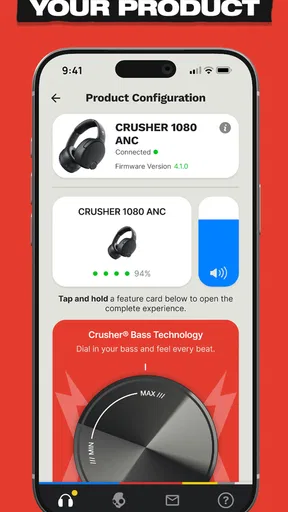
Before a long day away from home, I would check the battery status while I still have time to charge the earbuds. That is a small workflow improvement: it turns a last-minute surprise into a decision I can make before leaving. For troubleshooting, I would also separate an app issue from a listening issue. If music sounds wrong, compare another track and the default sound before changing multiple settings; if the earbuds themselves are not behaving as expected, check their connection and the app’s device view rather than assuming an equalizer adjustment will solve it.
People often wonder whether a companion app is necessary. I do not think it is essential for someone who is happy with the default sound and never needs to check or adjust their earbuds. It makes more sense for an owner who likes experimenting with audio or wants device controls in one place. I would also ask whether you are comfortable managing a separate app alongside your normal music service; if you want one app to handle everything from playlists to hardware, this is not a substitute for that broader setup.
Who is likely to get the most from it
I see the clearest fit for Skullcandy earbud owners who listen in varied situations and want to personalize the sound rather than accept one fixed presentation. Someone who moves between energetic music, podcasts, and quieter listening may appreciate having a way to revisit their preferred balance. A less interested listener can still use the app for occasional device checks, but may not find enough reason to open it regularly.
Skullcandy’s app is free, carries an Everyone age rating, and has passed one million installs. Its average rating is 3.3 from around fifteen thousand ratings, which suggests that experiences are mixed rather than universally smooth. I would take that as a reason to keep expectations practical: try the controls with your own earbuds and routine, and decide from that experience whether they solve a real problem for you.
First Impressions Matter
When I first opened the Skullcandy app, I was greeted by a sleek and intuitive interface. It's got this dark mode vibe, which makes it easy on the eyes, especially during those late-night jam sessions. Right off the bat, I could tell this wasn't just another app cluttering my screen. It felt like it was crafted for music lovers, by music lovers.
Personalizing Your Sound
One of the standout features here is the ability to tweak the sound to your liking. You know how sometimes the bass just doesn’t hit right? With the Skullcandy app, you can adjust the EQ settings to get that perfect sound balance. Whether you’re into heavy metal or smooth jazz, this app lets you customize the audio experience to match your vibe.
And let's talk about the presets. The app offers a range of sound profiles tailored for different genres. Just tap, select, and boom – your music transforms. It’s like having a DJ in your pocket, making sure each track hits just right.
Find My Buds – Because We All Lose Things
Now, here’s a feature that’s a lifesaver: the "Find My Buds" function. If you're anything like me, losing track of your earbuds is a regular thing. With this feature, the app helps you locate them with ease. It uses a map interface to show where your earbuds last connected, saving you from turning your house upside down.
Battery Life and Connectivity
Let’s get into the nitty-gritty of battery life and connectivity. The app provides a real-time battery status for your earbuds, so you’re never caught off guard during a critical moment in your favorite podcast. Plus, the connectivity is seamless. The app ensures a stable connection, minimizing those annoying drops that interrupt your listening flow.
Overall Usability and Extras
As for usability, the app is pretty straightforward. Even if you're not tech-savvy, you’ll find your way around without a hitch. The app also integrates with voice assistants, allowing hands-free control – perfect for when you’re on the go.
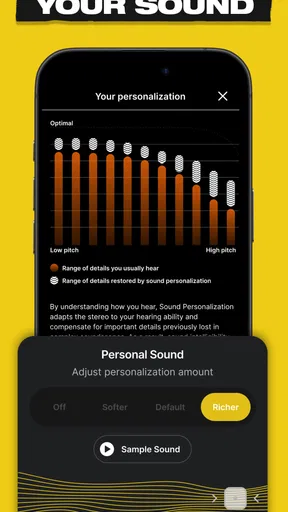
And there’s more! The app includes a "Personal Sound" feature, which creates a personalized audio profile based on your hearing. It’s like having tailor-made sound just for your ears. Seriously, who knew sound customization could be this personal?
Final Thoughts
So, what's the verdict on the Skullcandy app? In a word: impressive. It’s packed with features that genuinely enhance your audio experience. From personalized sound settings to practical solutions like "Find My Buds," it feels like they’ve thought of everything.
If you’re into music and own a pair of Skullcandy earbuds, this app is a must-have. It doesn’t just complement the hardware; it elevates it. Give it a whirl and let your ears bask in the glory of perfectly tuned sound. Trust me, your playlists will thank you.
Version and cost in context
The current version is 5.0.1, and the app was released on August 31, 2019. It is free to download, with in-app purchases listed from $4.99 to $49.99 per item. I would look at any optional purchase in relation to a feature I genuinely plan to use, rather than treating a purchase as necessary just because it appears in the app. For someone who only wants to try the basic companion experience, starting free is the sensible approach.
The minimum operating system requirement is version 9. That is worth checking before installing, particularly if you are setting up an older phone for a new pair of earbuds. The app’s purpose is specific enough that I would not download it as a general audio upgrade without compatible Skullcandy hardware; its strongest reason to stay installed is helping me make that hardware suit my listening habits.
My practical recommendation
For a Skullcandy owner who has wondered whether different sound settings would make daily listening more enjoyable, I think this app is worth trying. Start with a familiar track, make small adjustments, and check whether the result stays comfortable across music and spoken audio. Use the battery and locating tools as practical conveniences rather than expecting them to replace careful charging or keeping track of your earbuds.
If you prefer a fixed sound, use other brands’ headphones, or want one universal app for your entire music collection, you can skip it without missing a core part of your listening routine. But if you have compatible earbuds and like having a little more control, the combination of sound personalization and device-focused tools gives the app a clear, everyday role. I would keep it only if those controls make a noticeable difference to how I use my earbuds.
Pros
- High-quality audio experience.
- User-friendly interface.
- Customizable sound settings.
- Long-lasting battery life.
- Stylish design.
Cons
- Limited app compatibility.
- Occasional connectivity issues.
- No offline mode available.
- Requires frequent firmware updates.
- Limited color options.
FAQs for Skullcandy
What features does the Skullcandy app offer?
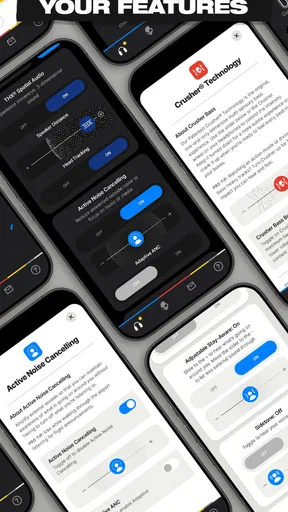
The Skullcandy app offers a range of features designed to enhance your listening experience. It includes personalized sound settings, equalizer adjustments, and firmware updates for your headphones. Additionally, it provides access to Tile technology to help locate your headphones if they are misplaced, ensuring you make the most out of your Skullcandy devices.
Is the Skullcandy app compatible with all Skullcandy products?
The Skullcandy app is compatible with a selection of their newer wireless headphones and earbuds. Before downloading, it's essential to check whether your specific model is supported. The app is primarily designed to work with devices featuring advanced features like personalized sound and Tile integration, ensuring you get the best experience.
How user-friendly is the Skullcandy app for new users?
The Skullcandy app is designed with simplicity in mind, making it user-friendly for both new and experienced users. The interface is intuitive, with straightforward navigation and clear instructions for setting up and customizing your device. Users can quickly learn how to adjust settings and make the most of the app's features without hassle.
Does the Skullcandy app require an internet connection to function?
While the Skullcandy app does require an internet connection for initial setup, firmware updates, and accessing certain features like Tile, it functions offline once the device is configured. You can adjust sound settings and use basic functionalities without an active internet connection, providing flexibility and convenience on the go.
Are there any privacy concerns with using the Skullcandy app?
The Skullcandy app prioritizes user privacy and collects minimal personal data. It primarily gathers usage statistics to improve user experience and requires location access for the Tile feature. However, users can review and manage permissions within their device settings to ensure they are comfortable with the level of data sharing.


